

What do SPF, DKIM and DMARC each do?
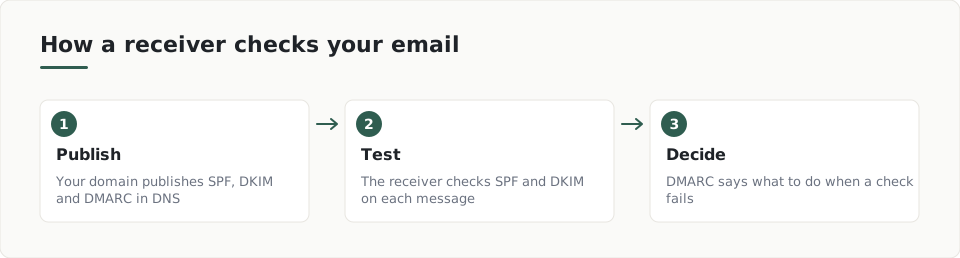
All three live in your domain's DNS, the public address book for your domain. Together they are email authentication checks that receiving mail servers can run on every message.
- SPF: the NCSC explains that it publishes the IP addresses trusted to send email for your domain.
- DKIM: the same NCSC guidance says it signs outgoing email to show it comes from your domain.
- DMARC: the NCSC describes it as a policy for how receivers treat email that fails SPF or DKIM, plus reports on how your email is handled.
RFC 6376 says a DKIM verifier fetches the signer's public key from DNS to check the signature. No certificate authority is needed.
How do SPF, DKIM and DMARC work together?
According to RFC 7489, the receiver compares the visible From domain with the SPF and DKIM results. That match is called alignment.
The same RFC says the DMARC policy can range from no action, through altered delivery, up to rejection. Receivers also send reports about mail claiming to be from your domain.
How do I check my own domain?
Look up the TXT records for your domain, or run a website security check to see what is published. The NCSC also offers a free email security check service.
_dmarc.example.com. IN TXT "v=DMARC1; p=none; rua=mailto:dmarc@example.com"The sample report shows how a missing DMARC record appears.
What order should I set them up in?
- List every service that sends email as your domain, such as your mail host, invoicing tool and newsletter service.
- Publish an SPF record for those senders. RFC 7208 says it must end in -all for receivers to make a firm negative decision.
- Turn on DKIM signing with each sender and publish the public keys they give you.
- Publish DMARC with p=none, read the reports, then tighten the policy once legitimate mail passes.
What mistakes should I avoid?
- Protecting only your main domain. The NCSC advises covering all your domains, including those on cloud providers.
- Forgetting a sender, so its mail fails the checks.
- Assuming a failed DKIM signature forces rejection. RFC 6376 says verifiers decide under local policy.
- Expecting DMARC to stop lookalike domains. RFC 7489 says it targets exact-domain spoofing only.
Why DKIM alone is not enough
RFC 6376 says the DKIM signing identity does not have to match the author address in any particular header field. DMARC alignment is what ties the signature back to the visible From domain.
Key terms
- SPF: A DNS record that lists which servers may send email for your domain.
- DKIM: A signature added to each email, checked against a public key published in your DNS.
- DMARC: A DNS policy that tells receivers what to do with email that fails SPF or DKIM, and asks for reports.
- Alignment: The match between the visible From domain and the domain that passed SPF or DKIM.
What to do
- List every service that sends email as your domain.
- Publish one SPF record that covers them all.
- Turn on DKIM signing for each sender.
- Publish a DMARC record starting at p=none.
- Read the DMARC reports before you tighten the policy.
- Repeat the setup for every domain you own.
Frequently asked questions
Do I need all three of SPF, DKIM and DMARC?
Yes. DMARC relies on SPF and DKIM results, and compares them with the visible From domain. Each one covers a different part of the check.
Will DMARC stop all fake email using my name?
No. RFC 7489 says it targets exact-domain spoofing. It does not address lookalike domains or display-name abuse.
Which DMARC policy should I start with?
Start with p=none and read the reports. Tighten the policy once your legitimate mail passes.
How ScanDefend fits in
ScanDefend checks the security headers a website sends to browsers.
Want to see what a finished report looks like? View the sample report.