

What is a CVE number?
CVE stands for Common Vulnerabilities and Exposures. Each CVE number names one publicly disclosed flaw, so everyone can talk about the same problem.
The US National Vulnerability Database (NVD) keeps a detail page for each CVE, where you look up an ID. Those pages are where a flaw's description, affected products and severity are published.
CVE-YEAR-NUMBERHow do I know if my website software is affected?
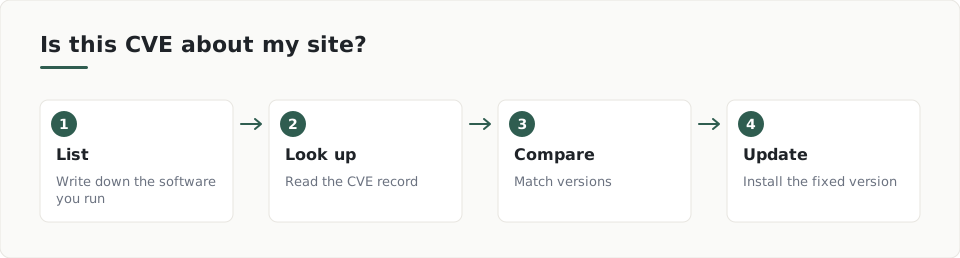
- List everything your site runs: the CMS, plugins, themes, the server software and the PHP version.
- Look up the CVE and read which products and versions it names.
- Compare those versions with yours.
- Find the fixed version in the advisory.
- Update to that version, or a newer one.
Your list may miss things. CISA notes that PHP is often part of other software and may not be directly visible, so check what your tools bundle. Read the CISA alert on PHP for a worked example.
A scan can also help. You can read about outdated software checks to see what a site announces publicly.
What does acting on a CVE look like in practice?
CISA's alert on two PHP flaws shows the pattern. It lists fixed versions: PHP 8.5.12, 8.4.27, 8.3.36 and 8.2.35.
- Patch systems that face the internet first.
- Take a system offline if it cannot be patched or runs PHP 8.1 or earlier, as CISA advises.
- Watch for PHP worker processes launching shells or downloading tools.
- A web application firewall may give partial protection, but it is not a fix.
What can a scan tell me, and what can't it?
ScanDefend checks a website for outdated software versions that the site announces publicly.
ScanDefend checks the software it finds on a website against published vulnerability data.
Software that hides its version will not show up this way, so keep your own list too. See the sample report for how a finding reads.
A note on the NVD pages
The NVD pages supplied for this article only showed a loading message, so this article does not describe any specific CVE record in detail. Always open the live record to read the current affected versions.
Key terms
- CVE: A unique ID for one publicly disclosed security flaw.
- NVD: The National Vulnerability Database, a US government site with a page for each CVE.
- Patch: A software update that fixes a known flaw.
What to do
- List the CMS, plugins, themes and PHP version your site runs.
- Look up any CVE you hear about on the NVD.
- Compare your versions with the fixed versions.
- Patch internet-facing systems first.
- Ask your host which PHP version your site uses.
- Check again after each update.
Frequently asked questions
Where do I look up a CVE number?
Use the National Vulnerability Database, run by the US government. Each CVE has its own detail page with a description, affected products and severity.
Does every CVE affect my website?
No. A CVE only matters if you run the named software in an affected version. Compare your versions with the advisory.
What should I patch first?
CISA advises prioritising internet-facing systems. Those are the ones anyone can reach.
How ScanDefend fits in
ScanDefend checks the software it finds on a website against published vulnerability data.
Want to see what a finished report looks like? View the sample report.