

What are TLS 1.0 and 1.1, and why switch them off?
TLS is the encryption that protects traffic between a visitor's browser and your site. It is the part of HTTPS that scrambles the data in transit.
The NCSC says TLS 1.0 and 1.1 have known vulnerabilities and lack current authenticated encryption cipher suites. The IETF deprecated both in RFC 8996, according to the NCSC guidance.
MDN says TLS 1.3 is the current and most widely used version. It adds that TLS 1.1 and 1.0 should no longer be used.
Who decides which TLS version your site uses?
Your browser and your server agree a version during the handshake, the opening exchange before any page loads. MDN explains that the server's TLS configuration sets the versions and algorithms on offer, as described on its TLS page.
So if old versions still work, the fix is in that configuration, not in the visitor's browser.
How do I disable TLS 1.0 and TLS 1.1 on my web server?
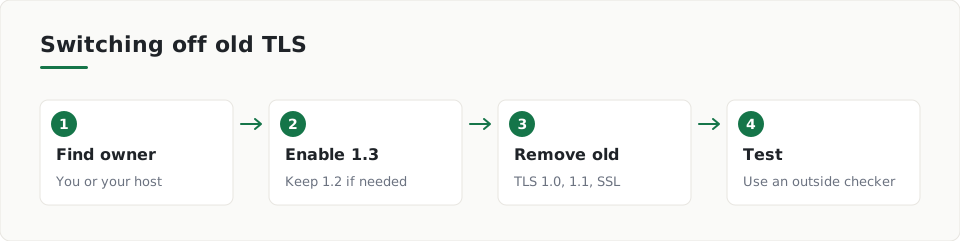
- Find out who controls TLS for your site: you on your own server, or a host or CDN (a service that serves your site from many locations).
- If a third party runs it, open its TLS or security settings and pick the most restrictive policy available. The NCSC advises this in its TLS guidance.
- If you run the server, generate a config with Mozilla's configuration generator, which MDN points to on its TLS page.
- Enable TLS 1.3. Keep TLS 1.2 only if some of your visitors need it.
- Remove TLS 1.0, TLS 1.1 and all SSL versions, then reload the server.
- Test again with SSL Labs or Mozilla HTTP Observatory, which MDN lists for checking HTTPS setups.
Should I keep TLS 1.2 as well?
Often yes, if you need it. MDN says some sites still use TLS 1.2, and the NCSC advises enabling TLS 1.3 and, where required, TLS 1.2, in its guidance.
The NCSC also says to plan a move to TLS 1.3 if you use TLS 1.2. Treat 1.2 as a fallback, not a goal.
When old versions cannot be turned off
The NCSC describes legacy TLS 1.0/1.1 profiles only for cases where those versions cannot be disabled. Otherwise it says to use the recommended TLS 1.2 or 1.3 profiles. Systems that still use deprecated versions need a time-bounded migration plan. Read the full detail in the NCSC TLS guidance.
How do I check that the change worked?
Run an outside test after each change. ScanDefend checks a website's encryption (TLS) setup, including protocol versions and ciphers.
Our website security check page explains what a scan covers. You can also look at the sample report first.
Key terms
- TLS: The encryption protocol that protects data moving between a browser and a website.
- Handshake: The opening exchange where browser and server agree a TLS version and cipher.
- Cipher suite: The set of encryption methods a connection uses.
What to do
- Find out whether you or your host controls TLS settings.
- Save a copy of the current server configuration.
- Enable TLS 1.3 and keep TLS 1.2 only if needed.
- Disable TLS 1.0, TLS 1.1 and all SSL versions.
- Keep server software up to date.
- Test the site again with an outside TLS checker.
Frequently asked questions
Why are TLS 1.0 and 1.1 a problem?
The NCSC says they have known vulnerabilities and lack current cipher suites. The IETF deprecated them in RFC 8996.
Will turning them off break my site?
Only very old browsers or systems are likely to be affected. Keep a copy of your old config so you can restore it.
What if my host controls TLS?
Choose the most restrictive policy your host or CDN offers. The NCSC advises this for third-party TLS.
How ScanDefend fits in
ScanDefend checks a website's encryption (TLS) setup, including protocol versions and ciphers.
Want to see what a finished report looks like? View the sample report.