


What is client website security hygiene?
Security hygiene means small, repeated habits that keep a site in a known good state. For a client site, the first habit is HTTPS and redirects: every page loads over a secure connection.
The NCSC says small organisations are as likely to meet online crime as large ones, with about 1 in 2 small businesses suffering a cyber incident every year. An agency looks after many small sites, so a routine matters more than a one-off clean-up.
MDN explains that TLS protects a connection through encryption, integrity and authentication. HTTPS is the web's use of TLS.
Who should own security on each client site?
The NCSC advises sharing responsibility across the whole team and not leaving it to one person. It also says many of its recommendations take as little as 5 minutes.
Even so, give each client site one named person who signs off the monthly check. Without a name, a shared task tends to slip.
- Site owner: the person who signs off the monthly check.
- Backup person: covers holidays and sickness.
- Client contact: receives the short monthly note.
- Access list: who can change DNS, hosting and the web server.
What should I check on every client site each month?
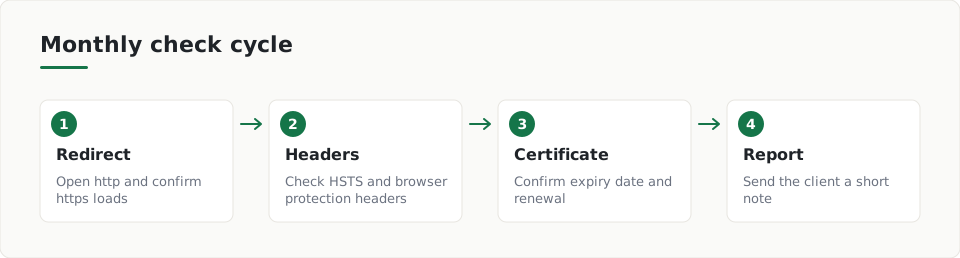
- Type the plain http address of the site and confirm you land on the https page.
- Check the response includes a Strict-Transport-Security header.
- Look at the certificate expiry date and confirm renewal still works.
- Check the TLS version the site offers.
- Open the key pages and watch for mixed content warnings.
- Write down what you found and what you changed.
MDN says a plain 301 redirect can be intercepted in an SSL stripping attack. The Strict-Transport-Security header (HSTS) makes the browser use HTTPS directly on later visits.
MDN names TLS 1.3 as the current version and says TLS 1.1 and 1.0 should no longer be used. Flag any client site that still offers them.
Which browser headers should I set on client sites?
OWASP says the right HTTP response headers can help prevent XSS, clickjacking and information disclosure. Headers are rules your server sends with each page, and the browser follows them.
- X-Content-Type-Options: nosniff makes browsers follow the declared file type and not guess it.
- An explicit Referrer-Policy states what the browser shares about the page you came from.
- A Permissions-Policy turns off features the site does not need, such as camera and microphone.
- CSP frame-ancestors or X-Frame-Options: DENY guards against clickjacking.
- Remove version details from the Server and X-Powered-By headers.
X-Content-Type-Options: nosniff
Permissions-Policy: camera=(), microphone=()
X-Frame-Options: DENY
Edge cases to test first
OWASP also advises against using Expect-CT. If a client site still sends it, you can remove it. Check the OWASP cheat sheet before you change a header, because a strict policy can break a page that relies on an old habit.
How do I report security checks to a client?
Keep the note short and plain. Say what you checked, what you found and what you fixed. Clients read a few lines, not a full audit.
- The date of the check and who did it.
- Anything that failed, in one sentence each.
- What you fixed and what still needs the client's decision.
- The date of the next check.
See how a written finding looks in the sample report. The how it works page explains the steps, and the pricing page lists the plans.
ScanDefend confirms a homepage answers over HTTPS, that plain HTTP visits are moved there and that browsers are told to stay on HTTPS (HSTS)
Key terms
- HTTPS: HTTPS is the web's secure connection, which uses TLS to protect the traffic between a visitor and your site.
- HSTS: HSTS is a header that tells a browser to use HTTPS only when it visits your site again.
- Mixed content: Mixed content is an insecure file, such as an image or script, loaded on a page that is otherwise secure.
What to do
- Name one owner and one backup for each client site.
- Open the http address and confirm it redirects to https.
- Check the site sends a Strict-Transport-Security header.
- Confirm the certificate renews and note its expiry date.
- Retire TLS 1.0 and 1.1 wherever a site still offers them.
- Remove version details from Server and X-Powered-By headers.
- Send the client a short note after each monthly check.
Frequently asked questions
How often should I check client websites?
Monthly is a sensible rhythm for the basics, because a short routine is easier to keep. Check sooner after any hosting, DNS or certificate change.
Do I need to close port 80 once HTTPS works?
No. The Let's Encrypt documentation lists keeping port 80 open as a best practice. Use it to redirect visitors to the secure page.
Who should own security for a client site?
Name one person per site, with a backup. The NCSC says responsibility should be shared across the team, but a named owner makes sure the check happens.
How ScanDefend fits in
ScanDefend confirms a homepage answers over HTTPS, that plain HTTP visits are moved there and that browsers are told to stay on HTTPS (HSTS).
Want to see what a finished report looks like? View the sample report.