

Why does my site show a dangerous warning?
A warning like this usually means a reputation service has marked your domain as unsafe. The reason could be malware, phishing content or something else.
One site owner on a Microsoft Q&A thread reported exactly this and asked how to remove it. That thread has no confirmed resolution and does not cover Chrome steps.

How do I find out what flagged my site?
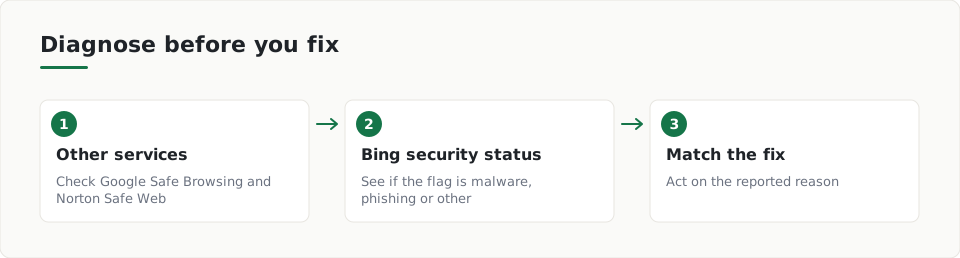
Start with a diagnosis. The advisor in the thread suggests checking whether other reputation services also flag your domain, as Microsoft's Q&A answer explains.
- Look up your domain in the Google Safe Browsing Transparency Report.
- Check the same domain on Norton Safe Web.
- Compare the results. This shows whether one vendor flags you or several do.
- Sign in to Bing Webmaster Tools and open the security status (Site Scan) page.
- Note whether the flag is for malware, phishing content or another reason.
What should I do once I know the reason?
The advisor calls the Bing Webmaster Tools security page the most important step, because the fix depends on the reason shown there. Per the same thread, the owner is asked to share the findings before any further action.
Follow that order. Write down what each tool reports, then match your next step to that reason instead of guessing.
What the source does not tell you
The source is a single forum thread with no outcome. It does not describe how long a review takes or how to request one. Check each vendor's own help pages for their removal process.
What can I check on my own site meanwhile?
While you wait on the diagnosis, run a website security check to see what your site shows publicly. It helps you spot setup problems you can fix.
It cannot see inside your server, and it does not look for signs that a site has been compromised. See the sample report to know what the results look like.
ScanDefend checks whether Google lists a website's homepage as unsafe.
How ScanDefend fits in
ScanDefend checks whether Google lists a website's homepage as unsafe.
Want to see what your own website shows the internet? Run a website security check.
Want to see what a finished report looks like? View the sample report.
Key terms
- Safe Browsing: A Google service that lists websites it considers unsafe.
- Reputation service: A service that rates whether a website looks safe or unsafe.
- Bing Webmaster Tools: A Microsoft tool where site owners can see their site's security status.
What to do
- Look up your domain in the Google Safe Browsing Transparency Report.
- Check your domain on Norton Safe Web.
- Sign in to Bing Webmaster Tools and open the security status page.
- Write down whether the flag is for malware, phishing or another reason.
- Match your fix to the reported reason.
- Run a scan of your homepage and read the findings.
Frequently asked questions
Does the source cover Chrome specifically?
No. The Microsoft Q&A thread is about a site flagged unsafe in Bing and does not mention Chrome. The diagnostic steps still apply to any flagged domain.
What is the first thing to check?
Check whether other services, such as the Google Safe Browsing Transparency Report and Norton Safe Web, also flag your domain. This shows whether the warning is limited to one vendor.
How do I find out why my site was flagged?
Sign in to Bing Webmaster Tools and open the security status page. It shows whether the flag is for malware, phishing content or another reason.
Want to see what your own website shows the internet? Run a website security check.
Want to see what a finished report looks like? View the sample report.