

Need a fresh look at your site's outside? Start with a quick scan, but know what it can and cannot tell you.
What can a free website scan see?
A scan behaves like a visitor's browser. It reads only what your site sends back, including how your HTTPS and redirects are set up.
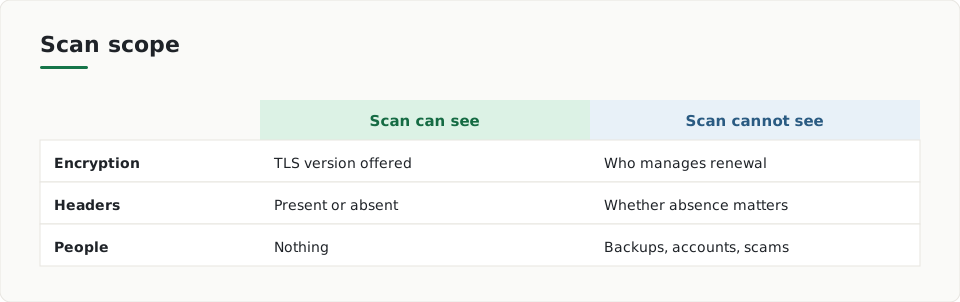
- Encryption: MDN says TLS 1.3 is current and TLS 1.0 and 1.1 should no longer be used. A scan sees the version your server offers.
- Headers: OWASP describes headers such as CSP as easy defences. They can be read from outside, so a scan reports whether they are present.
- Certificates: a scan can show that a valid certificate is in place. Let's Encrypt explains how certificates are issued and revoked.
Does a missing header always mean a problem?
Not always. OWASP notes that some headers only matter in certain contexts. CSP and X-Frame-Options suit pages that render content, but may mean little for a REST API response.
A scan can tell you a header is absent. It cannot decide alone whether that absence matters for your site.
What about headers that reveal your software?
OWASP says the Server and X-Powered-By headers reveal the software a site runs. It adds that attackers have other ways to fingerprint technology. Removing those headers does not make a site safe, so a scan result here is only a partial picture.
What can't an outside scan see?
Security also depends on people and daily habits. The NCSC small organisations guide covers backups, protecting devices and accounts, and spotting scams.
- Whether your backups exist and can be restored
- Whether staff devices are updated and protected
- How strong your passwords are and whether you use two-step login
- Whether someone on your team would spot a scam email
- Who looks after your certificate renewal
How should I use scan results?
- Read the evidence for each finding before you change anything.
- Ask whether the finding applies to your kind of site, such as a normal web page or an API.
- Fix the clear items first, such as a missing redirect to HTTPS.
- Cover the areas a scan cannot see: backups, accounts, devices and scam awareness.
- Run the scan again after your changes.
ScanDefend explains each finding in plain English, with the evidence and a suggested fix. You can see the format in a sample report, and read about the method on how it works.
Where does a scan stop?
ScanDefend reads only what a website already shows the internet.
Anything behind your login, inside your server or in your team's routines stays out of view. Treat a scan as one useful check, and plan the rest with your team.
Key terms
- TLS: The protocol that encrypts the connection between a visitor's browser and your server.
- Security header: A rule your server sends with each page that tells the browser how to behave.
- Fingerprinting: Working out what software a site runs from the clues it gives away.
What to do
- Run a scan and read the evidence for each finding.
- Check whether each missing header applies to your site type.
- Confirm your site redirects http visits to https.
- Make sure your server offers TLS 1.3 and no TLS 1.0 or 1.1.
- Check that your backups exist and can be restored.
- Turn on two-step login for your key accounts.
- Agree who renews your certificate.
Frequently asked questions
Can a free scan tell me if my site is safe?
No. It reports outward settings such as HTTPS, headers and certificates. It cannot see your server, your passwords or your backups.
Is a missing security header always a fault?
Not always. OWASP notes that some headers only matter for certain responses, so context decides.
Does hiding the Server header make my site safe?
No. OWASP says attackers have other ways to fingerprint the technology, so hiding it gives only a little help.
How ScanDefend fits in
ScanDefend reads only what a website already shows the internet.
Want to see what a finished report looks like? View the sample report.