

What does 'unauthenticated' mean to Gmail?
Gmail wants proof that a message came from the domain in its From address. That proof comes from DNS records you publish for your domain.
According to Google's sender guidelines, every sender needs SPF or DKIM, working forward and reverse DNS, TLS and a low spam rate. Unauthenticated mail can be marked as spam or rejected.
To see what your domain and website publicly show, a website security check is a reasonable place to start.
Which error code tells me what failed?
The Gmail enforcement FAQ says rejections carry codes that name the cause. Read the code in your bounce message before you change anything.
- 4.7.27 or 5.7.27: SPF failed.
- 4.7.30 or 5.7.30: DKIM failed.
- 4.7.31: no DMARC record.
- 4.7.32: the From domain does not align with the SPF or DKIM domain.
- 4.7.23 or 5.7.25: a problem with reverse DNS (the PTR record).
- 4.7.29 or 5.7.29: the message was not sent over TLS.
Google's sender guidelines also list a 5.7.26 error for unauthenticated messages.
How do I fix it?
- Find every service that sends mail as your domain: your mail host, your newsletter tool, your invoicing app.
- Publish one SPF record that includes all of them. The sender guidelines say it must cover every third-party sender.
- Turn on DKIM signing in each service. Google asks for keys of at least 1024 bits and recommends 2048.
- Add a DMARC record. A policy of p=none is accepted and is a safe starting point, since it blocks nothing.
- Check that your sending address has a matching reverse DNS (PTR) name, and that mail goes out over TLS.
- Send a test message to a Gmail address and read the result.
example.com. TXT "v=spf1 include:_spf.example.com ~all"_dmarc.example.com. TXT "v=DMARC1; p=none"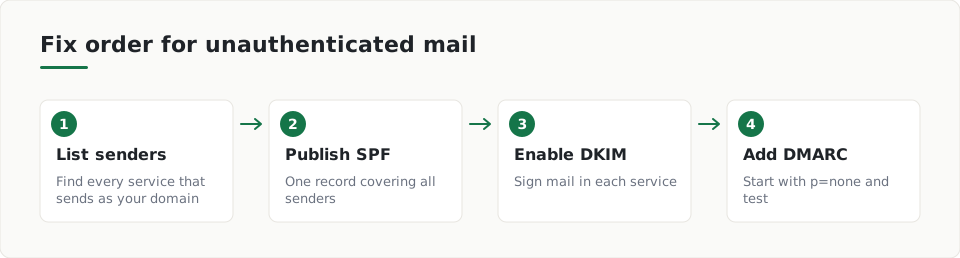
Do I count as a bulk sender?
Google's enforcement FAQ puts bulk status at about 5,000 messages a day to personal Gmail addresses from one primary domain. Once you reach it, the status stays.
Bulk senders need SPF, DKIM and DMARC, with the From domain aligned to the SPF or DKIM domain. Google also asks for one-click unsubscribe on marketing mail.
Spam rate limits and enforcement timing
The enforcement FAQ says senders should keep spam rates under 0.1% and never reach 0.3%, or they lose eligibility for mitigation. It also says enforcement began gradually in 2024 and ramped up in November 2025. Google Postmaster Tools has a compliance dashboard that shows where you stand.
What should I check after the fix?
Send fresh test mail and read any new error code. If the code changes, you have fixed one problem and found the next.
ScanDefend checks whether a domain publishes SPF and DMARC records
You can see what such a finding looks like in the sample report.
Key terms
- SPF: A DNS record that lists the servers allowed to send mail for your domain.
- DKIM: A digital signature added to each message, which receivers check against a key published in your DNS.
- DMARC: A DNS record that tells receivers what to do when a message fails SPF or DKIM checks.
- PTR record: A reverse DNS entry that maps a sending server's address back to a hostname.
What to do
- Read the error code in the bounce message.
- List every service that sends mail as your domain.
- Publish one SPF record that covers all of them.
- Turn on DKIM signing with a 2048-bit key where you can.
- Add a DMARC record starting at p=none.
- Check reverse DNS and TLS with your mail provider.
- Send a test to Gmail and read the result.
Frequently asked questions
Can I fix this with only SPF?
Google's sender guidelines say all senders need SPF or DKIM. Bulk senders need SPF, DKIM and DMARC.
Is p=none enough for DMARC?
Yes for Google's rules. The sender guidelines say the DMARC policy can be p=none.
Where can I see how Gmail views my domain?
Google says Postmaster Tools and its compliance dashboard help you monitor your sending status.
How ScanDefend fits in
ScanDefend checks whether a domain publishes SPF and DMARC records.
Want to see what your website shows the public? Run a website security check.
Want to see what a finished report looks like? View the sample report.